
FBA Reports Do Not Match? Check Dates Before Claiming a Loss
Use a date-range worksheet to investigate mismatched FBA inventory and reimbursement reports without confusing missing evidence with missing inventory.
When your FBA reports disagree, write down each file’s account, report type, date filter and export time. Compare the same scope, then look for relevant later compensation or inventory evidence. A missing row in a narrow export means the supplied evidence is incomplete; it does not prove that the inventory event remains unpaid.
Define which mismatch you are investigating
A report mismatch can mean different things: different row counts, different product quantities, a missing payment, or a changed balance. Write the exact discrepancy before collecting more files. For example: an inventory event is present in the September review, but no linked compensation is established in the reimbursement history supplied so far.
That statement is narrower and more useful than Amazon owes me money. It names the observation without assuming the cause. The workflow below is a review method for your records, not an Amazon eligibility rule or a universal reporting deadline.
Build a coverage worksheet before joining reports
Create one row per source file and capture the account, marketplace context, report type, selected date range and export time. For monetary data, record currency separately. Preserve the original filename so that you can reproduce the comparison later.
A selected report period and the moment you downloaded the file are different. Two exports using the same filter may not be equally current. Amazon describes the Reimbursements Report as itemized history updated daily. Do not assume every new event appears immediately in every report.
Inspect the date columns actually present in each file. A payment approval date and an inventory event date are not interchangeable join keys. If timezone or date interpretation is unclear, label it unknown and resolve it from the relevant report settings rather than inventing an offset.
| Record | What to write | Why it matters |
|---|---|---|
| Scope | Seller account and report type | Avoid comparing different populations |
| Date filter | Start and end exactly as selected | Make gaps or overlaps visible |
| Export time | When the file was downloaded | Separate period from freshness |
| Date meaning | Event date or approval date | Avoid joining unlike dates |
| Currency | Currency in monetary records | Avoid misleading cash totals |
Worked example: an event near month-end
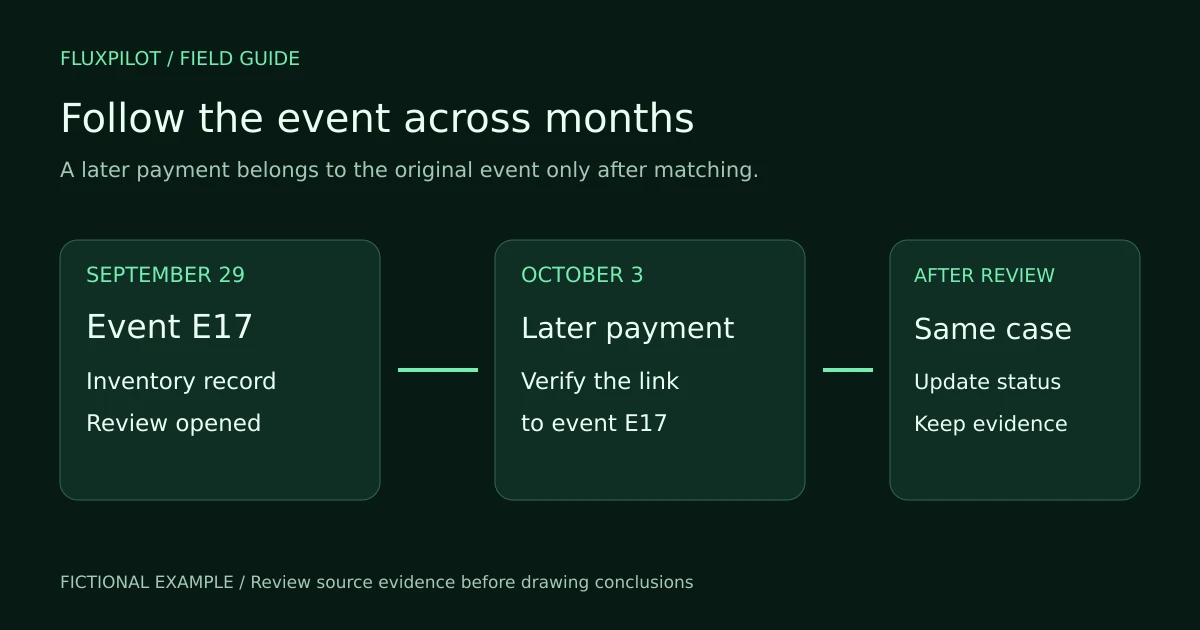
Consider fictional event E17 recorded on September 29. The first audit uses inventory and reimbursement files ending September 30. A later reimbursement record approved on October 3 is subsequently verified as belonging to E17.
The September-only reimbursement file cannot establish that later record. Keep September as the event’s original review period, and carry its unresolved review into October. When the linked evidence is verified, update the event status and retain the October source reference.
Do not count the October payment as a new September inventory loss or create a second event just because the evidence arrived in another month. Also do not assume a payment on October 3 belongs to E17 solely because the product matches. The relationship still needs verification.
| Date | Evidence | Review state |
|---|---|---|
| September 29 | Inventory event E17 | Investigate event |
| September 30 | Current files contain no verified compensation | Unresolved in supplied evidence |
| October 3 | Later payment appears | Verify event relationship |
| After verification | Payment linked to E17 | Update the existing review record |
Use a carry-forward register for unresolved events
Maintain one stable review reference per event with its original source, last checked date, current status and next evidence needed. The reference is your audit identifier; it should not pretend to be an Amazon case ID. Preserve the actual Amazon identifiers alongside it when available.
At the next review, start with unresolved records from the prior period. Check later evidence and update the same record. This prevents the same incident from repeatedly appearing as a newly discovered opportunity while also preventing older unresolved work from disappearing at month-end.
Use statuses that describe evidence: awaiting later report, needs event matching, resolved with reference, or ready for policy review. A report refresh and a policy deadline are separate concerns. Verify current applicable deadlines independently instead of assuming you can wait indefinitely.
Do not let expanded date ranges create duplicate totals
A wider export may overlap the file used last month. Before adding it to a working table, identify repeated source records. Do not add a full September file to a September-through-October file and assume every row is new.
Keep the originals, compare the potentially repeated item-level records, and document which copy contributes to the reviewed total. Preserve genuine adjustments and reversals. If a later file differs from an earlier version, investigate the changed fields rather than deleting whichever row produces an inconvenient balance.
Prepare the next action from the evidence gap
After aligning coverage, decide what is actually missing. A gap in file dates calls for a better export. A payment with unclear linkage calls for event matching. A confirmed unresolved event calls for a review of current policy and supporting evidence. These are different tasks and should have different next actions.
FluxPilot supports a report-based review of inventory findings, costs and supplied reimbursement history. Keep your file coverage notes with the underlying evidence, and recheck the actual records when a finding changes between reviews. This guide does not promise automatic synchronization or automatic resolution of cross-period cases.
A useful completion note is specific: reviewed E17 against the named files through the stated date; later compensation was verified, or a particular relationship remains unresolved. That note is more reproducible than a single unexplained recovery estimate.
Frequently asked questions
Does no payment in this month’s file prove the event is unpaid?
No. It establishes only what the supplied file shows. Check its coverage and verify relevant later evidence before deciding the event remains unresolved.
Should I combine every export into one total?
Only after reviewing scope, overlaps, signed adjustments and currency. Preserve source references so every included or excluded line can be explained.
Sources and further reading
Workflows and examples are from FluxPilot. Amazon policies change; verify the current policy for your marketplace before filing a claim.
Amazon FBA report definitions and update frequency